
Guides · Local SEO
Why Is My Business Not Showing Up on Google Maps?
A plain-English guide to the most common local-ranking problems, and what to do about them.
If your business isn’t showing up on Google Maps, the usual culprits are an incomplete or unverified Google Business Profile, wrong categories, weak relevance, distance limitations (including a hidden address that Google places outside the area you serve), low prominence, too few reviews, inconsistent citations, weak website and location signals, or a verification or suspension issue. Sometimes nothing is wrong except where and how you checked. Most of these are fixable, and this guide walks through them in the order worth checking.
 By Mike UnderwoodUpdated 14 min read
In This Guide
- 01First: which problem do you have?
- 02Check properly before you fix anything
- 03Google Business Profile setup
- 04Categories & services
- 05Relevance, distance & prominence
- 06Hidden address? Where Google thinks you are
- 07Reviews & reputation
- 08Citations & consistency
- 09Website & location signals
- 10Suspensions & verification issues
- 11Verified but still not showing up
- 12On Google but not on Maps
- 13Quick troubleshooting checklist
- 14What to do next
First: which problem do you have?
“Not showing up on Google Maps” means different things. Search your exact business name in the Google Maps app, then search your main service. What you see tells you where to start.
I can see my business in the top three, but customers say they can’t find it
You’re probably checking from your own location while signed in. Results change with where the searcher stands.
My business doesn’t appear at all, even when I search its exact name
A listing problem: not verified, suspended, still under review, or filtered as a duplicate.
It’s verified, but I still can’t find it on Google Maps
Often a new or recently edited profile, a hidden service-area address, or a duplicate being filtered.
It shows up for my name, but not when people search my service
A ranking problem: relevance, reviews, and website signals, not the listing itself.
It shows up near my office, but not in nearby towns
Distance. You can widen your reach, but proximity still matters, and a hidden address is ranked from where you verified it.
It was showing up, then suddenly disappeared
Check for a suspension, a rejected edit, or a recent name, address, or category change.
Check properly before you fix anything
Before changing anything, make sure what you saw is what a customer sees. Three things distort a quick self-check, and all three can make a healthy profile look broken.
How to check
- Check from the right place. Maps ranks by where the searcher is, so the view from your kitchen ten miles out of town is not the view from the town square. In Google Maps on a desktop, drag the map to the center of the area you want, then run the search.
- Check signed out. Use an incognito window and stay signed out of the account that manages the profile. Google shows owners their own listing more readily than it shows anyone else.
- Check the right thing. Searching your business name tests whether the listing exists. Searching your service tests whether it ranks. They fail for different reasons, and the fixes do not overlap.
- Then open the profile itself. Signed in as the owner, search your business name on Google. The merchant panel above the results shows verification state, pending edits, and a profile-strength meter. A red banner there outranks everything else in this guide.
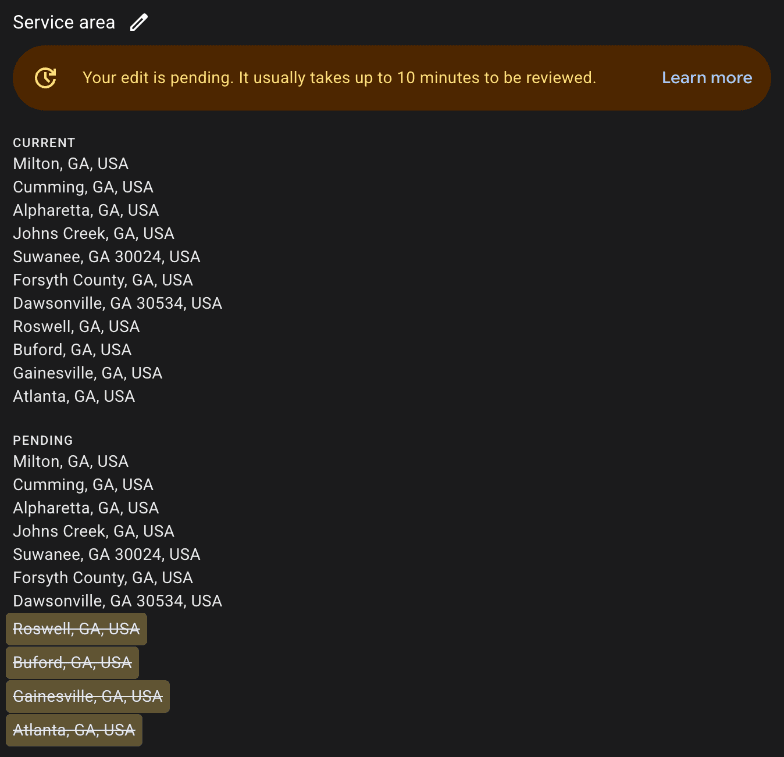
When a quick check keeps showing you in the top three but customers say they cannot find you, this section is usually the whole answer.
Google Business Profile setup
This is the first place to fix. Your profile must be claimed, verified, complete, accurate, and actively maintained. Make sure your business name, hours, address or service area, phone number, website, primary and secondary categories, services, description, and photos are all filled out and kept up to date. Missing or incorrect details can quietly hold your visibility back.
- Common mistakes: wrong category, blank services, outdated hours, poor photos.
- Listing a storefront address when you should use a service-area setup (or vice versa).
- Creating the profile once and never touching it again.
How to check
- Open the merchant panel by searching your business name while signed in. “Complete profile” prompts and a low profile-strength meter mean Google itself thinks fields are missing.
- Compare your listing with the three businesses in the pack you want: categories shown, review count, photo count, hours, and whether their website link opens a page about that city and service.
How to fix
- Fill every field Google offers, including the description, services, hours, and attributes, and keep the name exactly as it appears on your signage and paperwork.
- Add real photos on a schedule: logo, cover, team, work, and premises. Twenty or more is normal in a competitive pack, and stock photos break Google’s photo policy.
- Treat the profile as a page you maintain, not a form you filed. Post updates, answer reviews, and revisit the fields whenever something about the business changes.
Categories & services
Your primary category is one of the strongest clues Google gets about what your business is, and it strongly shapes which searches you can appear for. Choose the most accurate one for your core service first, then add relevant secondary categories and specific services. This helps Google understand exactly what you do and when to show you. Don’t stuff categories because they sound useful: relevance beats wishful thinking.

How to check
- Read the category line on each listing in the pack you want. That is the category Google shows for that search, and it is the one to match if it honestly describes you.
- Count how many of your real services have a matching category, or a listed service under one. Each gap is a search you are not eligible for.
How to fix
- Set the primary category to the one your best customers would use to describe you, then add specific services under it and under each additional category.
- Change the primary once, deliberately. Each change goes through review, and flipping it every week keeps the profile in a pending state.
Relevance, distance & prominence
Google says local rankings are largely driven by these three factors. In plain English: Google needs to believe you’re relevant, close enough, and trusted enough.
Relevance
How closely your profile matches what someone is searching for.
Distance
How close your business is to the searcher or the area they searched in.
Prominence
How well-known and trusted your business appears to be online.
Distance is the one you can’t fully control: rankings can vary block by block, and being based in one city doesn’t guarantee strong rankings in the next city over. But a stronger profile, website, and reputation can still outrank closer competitors in many searches, which is exactly why the rest of this list matters.
Hidden address? Where Google thinks you are
If you hide your address, because you work from home or go to the customer, Google still has to put you somewhere. It ranks a hidden-address business from the address you verified with, not from the middle of your town and not from the center of the service areas you list. Verify from a house ten miles outside the city you serve, and you rank like a business ten miles outside that city.
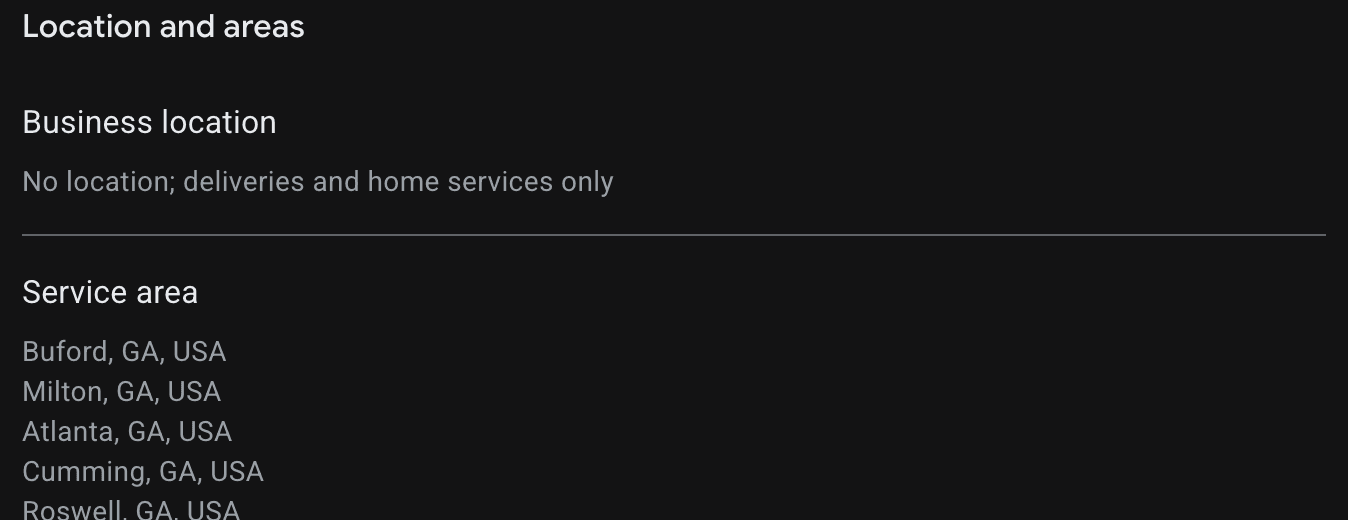
We are this business. Byte Of Peach is a hidden-address profile verified from an address south of Cumming. In November 2026 we checked the Maps results for “seo company cumming ga” from the center of town: the three profiles in the pack all had street addresses within about two miles of the square, and we sat twelfth. Search Console showed our profile reaching the pack for a few searchers closer to our verified address, which is exactly what the distance factor predicts.
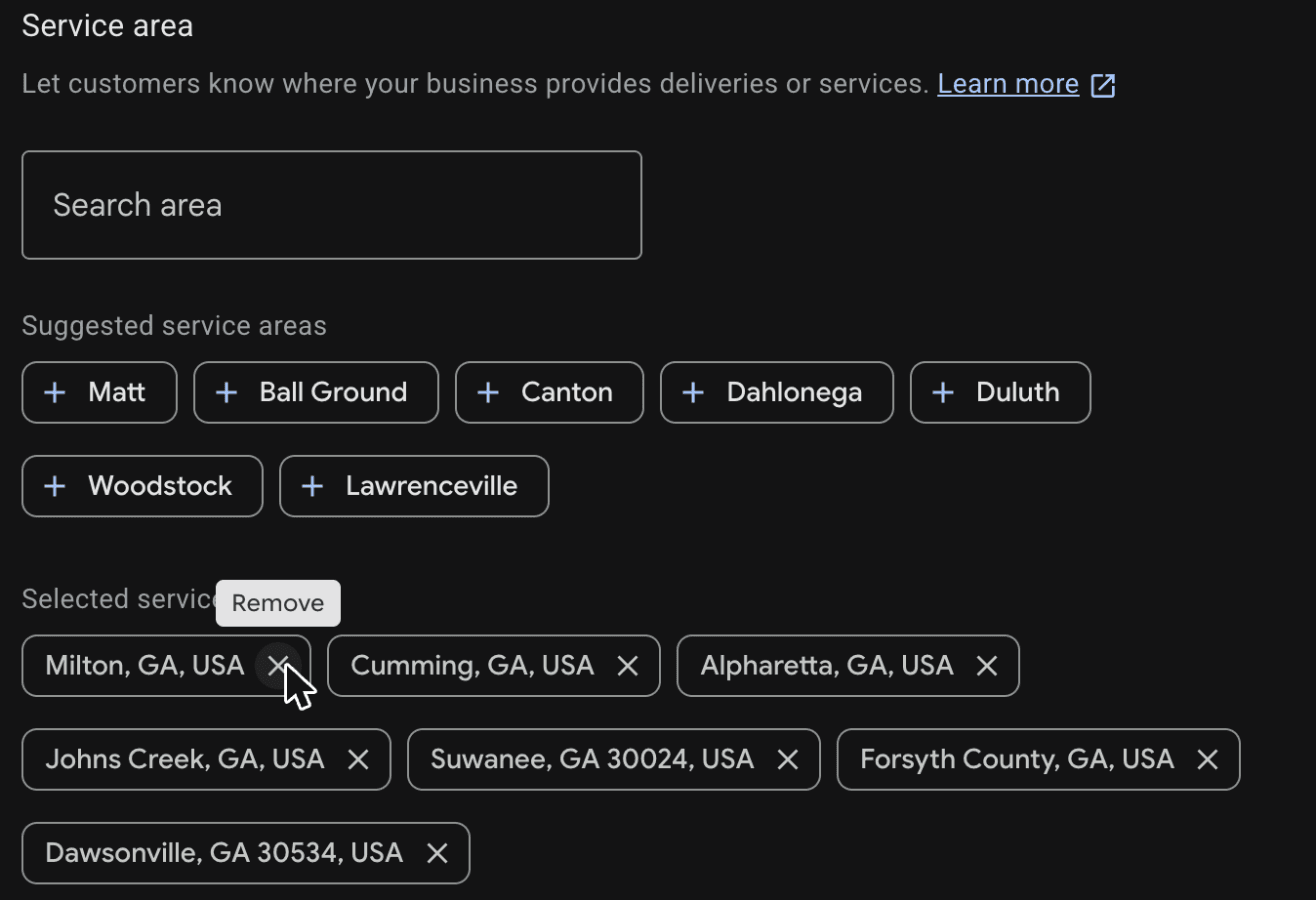
How to fix
- Keep the service-area list honest and tight. It tells customers where you will go. It does not move your pin, so adding every nearby city only muddies what you are.
- If you need to rank in a town you do not live in, the honest options are a real, staffed location there that you can verify, or winning the searches distance alone does not decide, with stronger relevance and reviews.
- Do not rent a mailbox or a virtual office to fake a location. It is against Google’s rules and a common cause of suspension.
- Give the website the job the pin cannot do. A location page for the town you serve can rank in the regular results under the map pack even when the pin is working against you.
Reviews & reputation
Reviews matter twice: Google has said reviews and positive ratings can help local ranking, and even when you do show up, weak reviews can cost you the click, the call, or the quote request. More high-quality, recent reviews signal trust and experience to both Google and people.
The pattern is visible in almost any pack. In the Cumming marketing-agency results we checked in November 2026, every profile in the top five had eleven or more reviews, and every profile with fewer than ten sat sixth or lower. Reviews did not decide the order inside the top three, but they decided who was eligible for it.
- Invite customers to leave honest reviews using a consistent request process and a direct link.
- Respond thoughtfully to reviews, good or bad, so future customers can see how you handle feedback.
- Never buy or fake reviews, and don’t let six months pass between requests.
Citations & consistency
A citation is any mention of your business information online: name, address, phone, website. These should be consistent across directories, social profiles, and industry sites. If one site says “123 Main Street,” another says “123 Main St. Suite B,” and a third has an old phone number, that inconsistency creates friction. Citations alone won’t launch you to the top of Maps, but messy data weakens Google’s trust in what it sees.
How to check
- Search your phone number in quotes, then your business name with your old address if you have moved. Anything that comes back with different details is a citation to fix.
- Look at where the pack holders are listed. The directories they share, such as the local chamber, the BBB, and the large data aggregators, are the ones Google reads for your market.
How to fix
- Fix wrong listings before creating new ones. A wrong phone number on a major directory does more damage than a missing listing on a minor one.
- Use one exact version of the name, phone, and website everywhere, matching the profile character for character.
- If your address is hidden on Google, keep it off directories too, both for consistency and so you are not publishing your home.
Website & location signals
Your profile and your website are not separate things: the website validates your Maps presence. It should back up your profile with clear service pages, location pages where appropriate, matching contact information, local keywords used naturally, strong mobile usability, and local proof like testimonials, photos, and case studies. A profile helps people find you; a strong website helps Google believe you deserve to be found. This is a big part of how we approach local SEO.
How to check
- Click the website link on your own profile. The page it opens should name the city you serve and the service you want to rank for within the first screen.
- Confirm the phone number, hours, and business name on the site match the profile exactly, and that the site links back to the profile.
How to fix
- Point the profile at a page about the business in that place when the homepage does not already do that job.
- Add LocalBusiness structured data that mirrors the profile, embed the profile’s map, and quote real reviews word for word.
- Make the site fast on a phone. Most clicks from the pack come from phones, and a slow page wastes the click you worked for.
Suspensions & verification issues
If your profile is suspended, pending, or unverified, your visibility can drop sharply or disappear completely. Common causes include keyword-stuffing the business name, address problems, overlapping duplicate listings, and ineligible virtual-office setups. If a profile that was ranking suddenly isn’t, check its status first: log in, look for alerts or missing edits, and resolve guideline violations before touching anything else. When a listing is suspended, ranking work isn’t the first problem. Reinstatement is.
Use Google’s suspended-profile instructions to review the issue and appeal. If the profile is active but still needs verification, follow the verification steps shown for your business. Google chooses the available verification methods.
How to tell
- A red or amber banner in the merchant panel: suspended, verification needed, or edits pending review.
- The knowledge panel for your name disappears, reviews stop showing, or the Maps listing says the business is unverified.
- Nothing is wrong except that you changed the name, category, or address in the last few days. Those edits are reviewed before they publish, and the old value stays live until then.
While an edit is pending, leave it alone. Stacking more edits on a pending profile is a common way a simple fix turns into weeks of limbo.
Verified but still not showing up
Verification makes your profile eligible to appear. It doesn’t guarantee you’ll see it where you look. If you’re verified and still can’t find yourself, work through these before assuming something is broken:
- It’s new or was just edited. New profiles and changes to name, category, or address are reviewed before they show, which can take a few days.
- You’re a service-area business with a hidden address. Search your business name rather than looking for a public street address. Adding service areas does not remove the distance factor in local rankings.
- Google is filtering a duplicate. Two listings for the same business (or an old one from a previous address) can suppress each other.
- You’re searching from the wrong place. Results depend on where the searcher is. Check from a phone near your customers, not just your office.
- You show up for your name but not your service. That’s ranking, not visibility: categories, reviews, and website signals are the fix.
On Google but not on Maps
This one is common and almost always a misread. Someone searches your name on Google and your knowledge panel appears, so you conclude you are “on Google.” Then they open the Maps app, search for your service, and you are not in the list. The listing is on Maps. What failed is the ranking for that service search, which is a different problem with a different fix.
How to check
- In the Maps app, search your exact business name. If the listing appears, it exists on Maps and you have a ranking problem: go to categories, reviews, and the website.
- If the name search also fails in Maps, treat it as a listing problem: a profile created in the last day or two that is still propagating, a duplicate being merged into another listing, or a suspension whose Search panel is still cached.
- Compare the two surfaces from the same place and the same account. Search and Maps are produced by related but separate systems, and a listing can appear in one before the other.
If everything above checks out, the remaining explanation is competitive: someone else has built stronger relevance, reviews, and trust for that search. That is fixable, and the sections above are the order to fix it in. Not sure which one it is? We’ll check for you. Our free growth plan includes a Business Profile check: whether you’re eligible to show, where you rank across your service area, and who’s beating you for your main searches.
Build a clear presence across local search
Accurate business information, useful service pages and a strong reputation help customers assess you across Search, Maps and AI answers. These surfaces use different systems, so visibility in one does not guarantee a position in another.Local SEO strengthens the underlying business information while tracking the searches and locations that matter to you.
Frequently Asked Questions
Why is my business verified but not showing up on Google Maps?
Verification only makes you eligible to appear. A verified profile can still be hard to find because it’s new, because recent edits are still under review, because Google is filtering it as a duplicate of another listing, because it’s a service-area business with a hidden address (so there’s no pin to look for), or because stronger competitors outrank it for that search. Search your exact business name first: if you appear for your name, it’s a ranking problem, not a listing problem.
Why does my business show up on Google but not on Google Maps?
Usually it does exist on Maps, it just isn’t ranking for the search you tried. Searching your business name shows your profile almost anywhere; searching your service shows the businesses Google thinks are most relevant, closest, and most prominent for that searcher. Check the Maps app with your exact name, then work on relevance, reviews, and your website for the service searches.
How long does it take for a new business to show up on Google Maps?
A newly verified profile often becomes findable by name within days, but it can take longer, and ranking for competitive service searches takes weeks to months of reviews, profile activity, and website signals. Edits to an existing profile are reviewed before they go live, which can also take a few days.
How long does it take to improve Google Maps rankings?
Sometimes improvements happen quickly after fixing major profile issues, like a wrong category or an unverified listing. In more competitive markets, meaningful improvement can take weeks or months as reviews, citations, and website signals build up.
Can I rank outside my city?
Sometimes, but not equally everywhere. Distance still matters, especially for searches with strong local intent, and rankings can vary block by block across your service area. A stronger profile and website widen your reach; they don’t erase geography.
Do reviews really matter?
Yes, twice over. Google has said reviews and positive ratings can help local ranking, and even when you do show up, weak or stale reviews can cost you the click and the call. More strong, recent reviews improve both visibility and conversion.
Can a suspended profile still show up?
Visibility is usually heavily affected or gone entirely. If your profile is suspended or stuck in verification, address that first. Reinstatement comes before optimization.
Does adding more service areas help me rank in those towns?
No. Service areas tell customers where you work. Google ranks a hidden-address business from the address it verified, so listing a town does not move you closer to it. If you need to rank there, the honest options are a real, staffed location in that town, or stronger relevance and reviews to win the searches that distance alone does not decide.
Can I pay Google to rank better in Maps?
No. You can run ads on some Google surfaces, but organic local ranking is not for sale. Anyone promising otherwise is selling something else.
Quick troubleshooting checklist
- Did you check from the center of your target area, signed out?
- Is the profile claimed and verified?
- Is all profile information complete and accurate?
- Is the primary category correct?
- Are secondary categories and services filled out?
- Do you have recent, legitimate reviews?
- Are you responding to reviews?
- Is your business information consistent across the web?
- Does the website clearly support the location and services?
- Is there a verification, suspension, or edit issue?
- If your address is hidden, is the verified address inside the area you want to rank in?
All yes and still invisible? Then it’s competitive strength: someone else has built stronger relevance, prominence, and trust signals over time. That’s fixable too. It just takes consistency.
What to do next
Don’t try to hack Google Maps. Start with a solid profile foundation, then fix category and service accuracy, build a real review-request process, clean up your citations, and strengthen the website behind it all. Prominence builds over time. Small, consistent improvements add up, and they help you show up where it matters.
Most businesses don’t need a trick. They need consistency.
New to all of this? Start with Is SEO worth it for your local business?
Free Business Profile check
Still not sure why you’re missing?
Tell us your business and we’ll check your profile, where you rank across your service area, and who’s outranking you. A person reviews it, and you get the answer by email. We'll reply within one business day and confirm when your plan will be ready.
Check my profileMike Underwood
SEO Specialist at Byte Of Peach
Mike is an SEO Specialist at Byte Of Peach, writing about local search and Google visibility.

Learn. Apply. Grow.
Ready to improve your Maps visibility?
Find what keeps nearby customers from finding your business and what they see when they do. Get priorities for your profile, local listings, reviews, and website.
- No obligation
- Practical recommendations
- Built around your business
Practical advice
Grounded in real project experience.
Tailored strategy
Know what to work on next.
Real growth
Put good ideas to work.
